Editable QR tattoo pages
QR Code Tattoo Generator
Create one short QR address for permanent ink, then update the page or redirect behind it without changing the tattoo. Start free, export a clean code and test the exact design before tattooing.
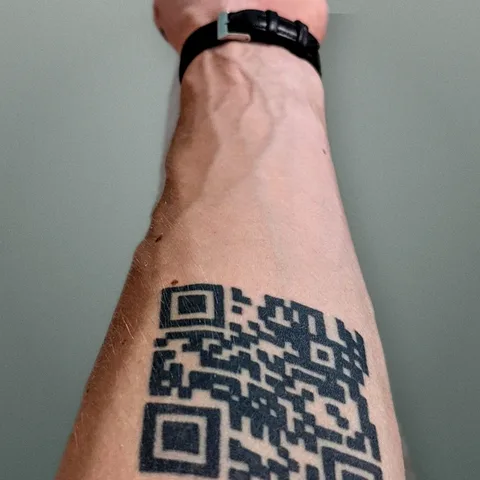
Personal experience
Built from a real QR tattoo
Linkink started with its founder's own problem: the QR on skin cannot change, but the page behind it must. The tattoo keeps one stable route while its links, content and redirects remain editable.
The long-term support plan and its practical exceptions are described in the Terms of Use.
Generate a dynamic QR code for a tattoo
Linkink creates a stable public route that the QR encodes. You can change the hosted page or redirect later while the QR pattern stays the same. The route still depends on the Linkink domain and service remaining available, so permanent ink should never rely on claims of infinite hosting.
Start with a short stable URL
A short encoded address usually needs fewer QR modules than a long social or tracking URL. Fewer, larger modules can give an artist more room to preserve the square grid, although URL length alone does not make a tattoo safe or scannable.
Keep the destination editable
Point the tattoo to a portfolio, booking page, music release, memorial, contact page or direct redirect. Change that destination from the Linkink dashboard without regenerating or altering the tattooed QR code.
Use a plain high-contrast export
For the tattoo artifact, favor a square black-and-white code with distinct modules and a clear border. Decorative eyes, gradients, logos and AI-generated styling can reduce scan tolerance. Artistic elements should stay outside the functional QR grid and quiet zone.
Preserve the four-module quiet zone
Keep an empty border at least four QR modules wide around every side of the code. Nearby lettering, shading, frames and other tattoo lines can interfere with detection even when the internal modules were transferred accurately.
Choose size from the actual module count
There is no honest universal tattoo size. Physical size must account for how many modules the final code contains, how clearly the artist can reproduce each module, skin curvature and the intended scan distance. Review the exact final design with an experienced tattoo artist.
Print and scan the exact export
Print at the intended physical dimensions without stretching, cropping or using fit-to-page scaling. Test the same file on multiple current phones, from several distances and in varied light. A different sample QR is not evidence for the code you will tattoo.
Scan the stencil before ink
The body can curve, stretch or distort a square design. After the artist applies the stencil, scan it on the intended placement while the body is held naturally. Reposition or resize the design if the stencil does not scan consistently.
Retest after healing
A working stencil is only the starting checkpoint. Ink spread, scabbing, fading, sun exposure and later skin changes can affect module separation. Follow the artist's aftercare guidance and test again after the artist considers the tattoo healed.
Plan for physical and web failures
A camera can fail to decode damaged geometry, and a perfect code can still open a dead destination. Keep account access current, maintain the hosted page, use a readable fallback URL where possible and periodically check both the tattoo scan and the page it opens.
Frequently asked questions
Is the QR code tattoo generator free?
You can start with one free editable Linkink QR page. Paid plans add features such as more pages, direct redirects, advanced analytics, custom presentation and higher-resolution export workflows.
Can I change the link after the QR is tattooed?
Yes. The tattoo encodes one stable Linkink route, and you update the page or redirect behind that route. The physical QR modules do not change.
Does the generator guarantee a scannable tattoo?
No. Software can generate valid QR geometry, but final reliability also depends on physical size, placement, stencil transfer, artist execution, healing, contrast and camera conditions.
What file should I give the tattoo artist?
Use the clean high-contrast export and an exact-size print with the complete quiet zone visible. Confirm that the artist is working from the same artifact you tested, then scan the applied stencil before tattooing.
Should I add a logo or artistic pattern inside the QR?
Avoid altering functional modules for permanent ink. Decorative styling may scan on a screen yet lose tolerance after transfer and healing. Keep artwork outside the QR grid and quiet zone unless the exact final design passes repeated physical tests.
How large should a QR code tattoo be?
There is no single minimum that fits every code and body area. Base the decision on the final module count, module size the artist can reproduce, placement curvature and exact-size stencil tests on multiple phones.
Choose what your QR opens
Keep one physical QR and update the page behind it. Choose a guide or template for the place where people will scan it.