Editable QR tattoo pages
QR Tattoo Size Calculator
Enter the version of your final QR code and its intended total width. The calculator separates the functional symbol from the required four-module quiet zone and shows the physical size of each module.
Interactive planning tool
Calculate the physical QR grid
Use the version and total intended width from the exact QR artifact. The comparison threshold is your own planning value, not a Linkink safety certification.
Before ink: print at actual size, measure the result, scan it on several phones, and scan the applied stencil on the intended body placement.
Personal experience
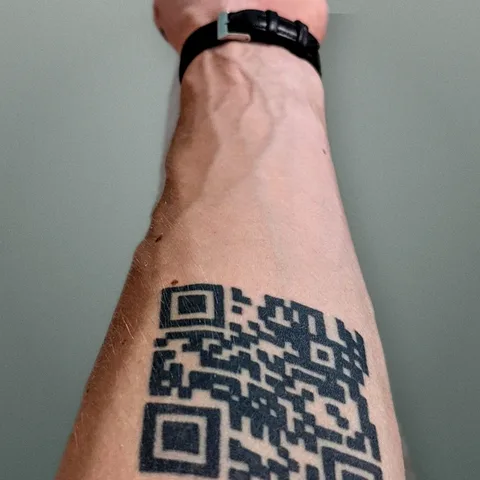
Built from a real QR tattoo
Linkink started with its founder's own problem: the QR on skin cannot change, but the page behind it must. The tattoo keeps one stable route while its links, content and redirects remain editable.
The long-term support plan and its practical exceptions are described in the Terms of Use.
Why QR version changes tattoo size
QR Code Model 2 starts at Version 1 with 21 modules per side. Every higher version adds four modules per side, up to Version 40 with 177. The same physical width therefore produces smaller individual modules when the version is higher.
What the calculator measures
The result shows the core symbol grid, total grid including an eight-module allowance for four quiet-zone modules on each side, physical module size, core symbol width and quiet-zone width on each edge.
Use the final exported QR
Do not calculate from a placeholder or a similar code. Destination length, character encoding and error-correction level can change the QR version. Confirm the module count on the exact export that the artist will transfer.
Quiet zone belongs in the total width
A QR Code requires an empty margin four modules wide on every side. If a design is described as 50 mm wide but the quiet zone sits outside that measurement, the physical area required on skin is larger than 50 mm.
There is no universal tattoo minimum
The QR standard defines geometry, not a guaranteed tattoo module size. Skin, placement, line spread, stencil transfer, artist technique, healing and camera conditions vary. The calculator compares against a minimum entered by you and your artist; it does not certify the result.
Shorter routes can reduce density
Encoding a short stable route can allow a lower QR version than encoding a long destination with tracking parameters. A lower version has fewer modules, which can make each module larger at the same total physical width.
Print at actual size
After calculating, print the exact QR without fit-to-page scaling, stretching or cropping. Measure the printed square, confirm that the quiet zone is intact and scan it with multiple current phones at realistic distances and angles.
Test the applied stencil
Paper testing cannot reveal distortion from body curvature, movement or stencil transfer. Scan the applied stencil on the intended placement before tattooing and change the size or placement if the result is inconsistent.
Retest after healing
A stencil scan proves only the starting geometry. Follow the artist's aftercare guidance, wait until the artist considers the tattoo healed, and then test again in varied lighting. Repeat checks over time as the tattoo and skin change.
Frequently asked questions
How is QR tattoo module size calculated?
Divide the total physical width by the core modules plus eight quiet-zone modules. A Version 3 QR has 29 core modules, so its total calculation grid is 37 modules wide when the four-module quiet zone is included on both sides.
How many modules are in each QR version?
Version 1 contains 21 by 21 modules. Each higher version adds four modules per side, so the formula is 21 plus four times version minus one. Version 40 contains 177 by 177 modules.
Does the calculator include the quiet zone?
Yes. It adds four clear modules on the left, right, top and bottom. The total width therefore spans the core symbol width plus eight module widths.
What minimum module size should I enter?
Use a value agreed with the artist after reviewing the exact design, placement and stencil process. Linkink does not publish a universal safe tattoo module size because physical results vary.
Does a passing result guarantee the tattoo will scan?
No. The comparison only checks arithmetic against the minimum you entered. Scan reliability still depends on accurate geometry, contrast, placement, stencil transfer, execution, healing and camera conditions.
Where do I find my QR version?
Use export metadata when your QR tool provides it, or count the number of modules along one edge of the core symbol and match that count to the version formula. Do not include the quiet zone in the core module count.
Choose what your QR opens
Keep one physical QR and update the page behind it. Choose a guide or template for the place where people will scan it.